Xbox One Update Simplifies And Streamlines Interface
 David Wildgoose
26 Feb 2020
David Wildgoose
26 Feb 2020
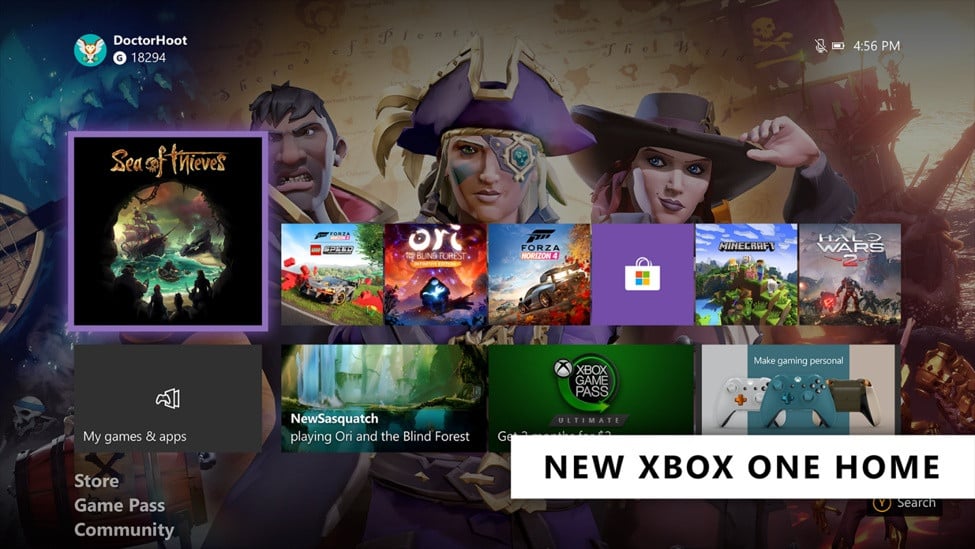
Xbox has rolled out a raft of interface changes for the Xbox One in its February 2020 Xbox One Update.
The biggest design change comes on the Home screen. Xbox calls the new design “simplified and streamlined.”
Previously the Home screen featured a series of tabs (or “twists” as Xbox calls them, for inexplicable reasons) along the top for the various sections: Xbox Game Pass, Mixer, Xbox Community, and the Microsoft Store.
Now, these tabs have been swapped out in favour of dedicated rows for each section. Additionally, users are now able to add and remove rows to customise their dashboard.
Digging deeper into the interface, the My Games & Apps section is more streamlined with labels for trials and demos and better tools for organising your library.
Elsewhere, images and animated gifs are now supported in messages, users can choose where notifications are displayed onscreen, streaming service Mixer has receive a clutch of viewing improvements, and console storage management now provides suggestions and more options.