Microsoft’s Gaming Copilot Offers Tips, Tricks and 24/7 Assistance
 Nigel Bowen
19 Sep 2025
Nigel Bowen
19 Sep 2025

Microsoft has started testing a new AI assistant designed for gamers, rolling out its ‘Gaming Copilot’ (Beta) through the Windows Game Bar. For now, the feature is only available to Xbox Insiders in selected markets.
The good news for local gamers is that one of those selected markets is Australia. The others are the US, New Zealand, Japan and Singapore.
Gaming Copilot is meant to act as an in-game sidekick, answering player questions, helping discover new titles, and surfacing achievements without users needing to leave their game.
As Microsoft Chairman and CEO Satya Nadella recently tweeted, “With Copilot for Gaming, you can jump back into games faster, get real-time coaching, and stay connected… all on your own terms.”
It is built directly into the Game Bar overlay, which can be opened with a simple keyboard shortcut.
The assistant comes with Voice Mode, letting players talk to Copilot during gameplay.
There’s also a screenshot feature that helps the AI ‘see’ what is happening on screen to provide more relevant guidance.
Microsoft says the tool also personalises responses by drawing on the user’s Xbox history and current game activity.
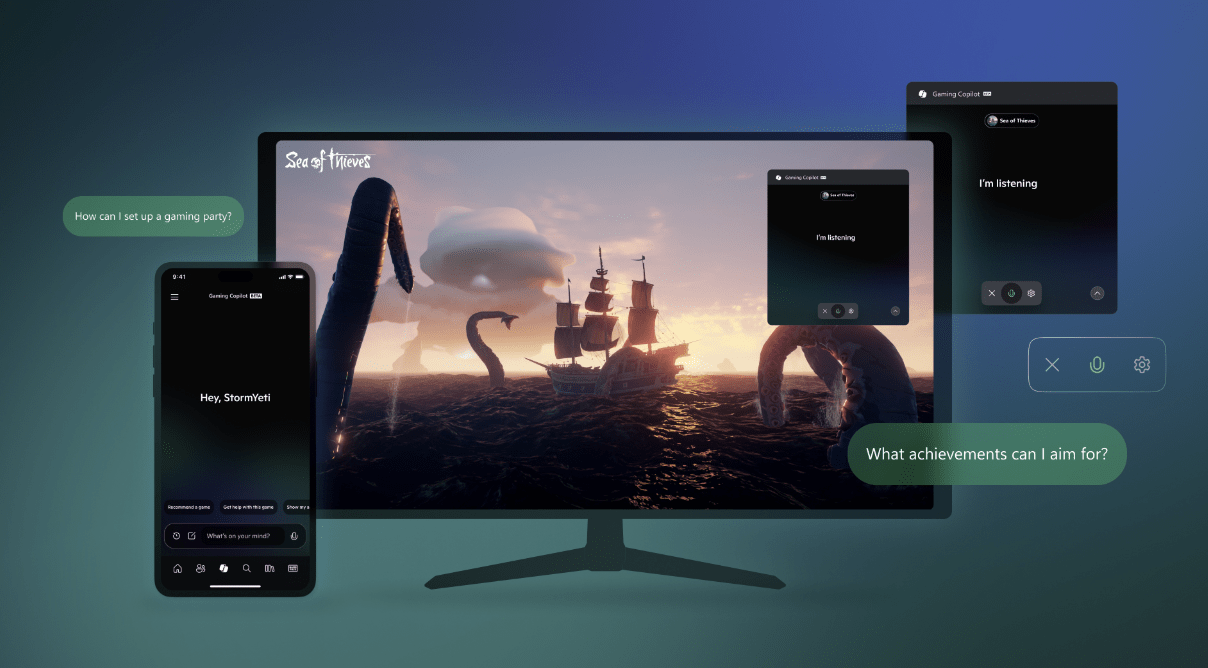
If your a novice or struggling gamer, an AI assistant might be just the trick
Functionality is more limited on Windows handheld PCs, with Microsoft noting optimisation work is still underway for smaller form factors.
While the company is pitching Gaming Copilot as a helpful companion, early reactions have raised questions about accuracy, possible performance trade-offs in resource-heavy titles, and how Microsoft handles privacy when screenshots or voice inputs are involved.
Microsoft has signalled it will continue adding features, including more proactive coaching and deeper personalisation.
Whether Gaming Copilot becomes an indispensable tool for gamers or a short-lived experiment will depend on execution.
As well as whether gamers find their AI wingman’s advice better than what they can already easily source from forums, Discord or YouTube.