Microsoft Adds ‘Companion Apps’ to Windows 11 Taskbar for 365 Users
 Joe Gallop
14 Aug 2025
Joe Gallop
14 Aug 2025

Microsoft has begun rolling out a new set of lightweight “companion apps” for Windows 11, giving Microsoft 365 business users faster access to key tools directly from the taskbar.
The trio of apps – People, File Search and Calendar – launch automatically at startup, offering instant access to contacts, documents and schedules without opening full applications.
It appears to be a strategic step by Microsoft by embedding 365 deeper into the Windows experience – a tactic that may attract further scrutiny from regulators.
The European Commission recently required Microsoft to unbundle Teams from its Office and Microsoft 365 suites after complaints from competitors about unfair integration.
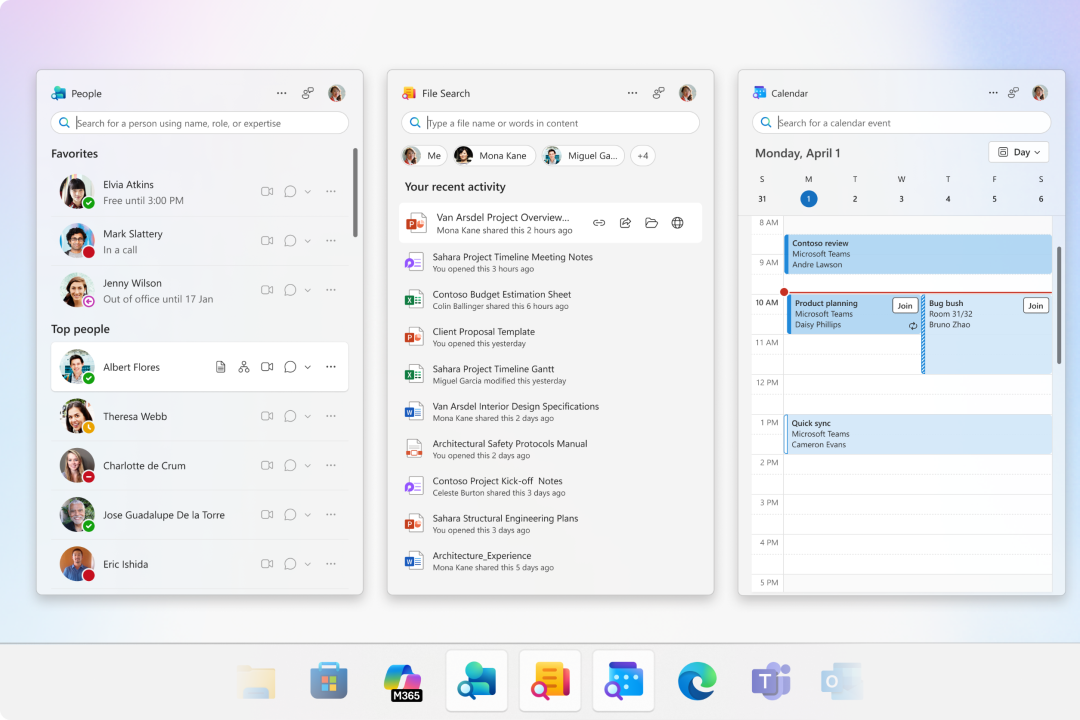
In the new update, the People app lets staff browse their organisation’s chart, search for colleagues and start a Microsoft Teams chat, call or email in a single click.
The File Search companion enables users to find Microsoft 365 files across OneDrive, SharePoint, Teams and Outlook by name, author or keyword, with options to preview, filter and share documents straight from the taskbar.
The Calendar app provides a quick view of upcoming events, the ability to search appointments and join meetings instantly.
Microsoft first announced the apps at its Ignite conference last year and has been testing them with selected business customers.
This month’s release marks general availability, although IT administrators must opt in to deploy them on Windows 11 devices. Once installed, users can disable automatic startup if they prefer.
While the features themselves aren’t entirely new, integrating them directly into the taskbar is part of Microsoft’s broader push to make Windows 11 a more seamless hub for productivity. The move reduces the need for constant app switching, allowing users to act on tasks faster.