Google TV Moves Navigation to Top-Left Corner in First Major Redesign Since 2020
 Isabella Alexiou
23 Sep 2025
Isabella Alexiou
23 Sep 2025
Google is testing a redesigned interface for Google TV that reorganises navigation and streamlines access to key features, marking the platform’s first significant visual update since rounded icons were introduced in February 2024.
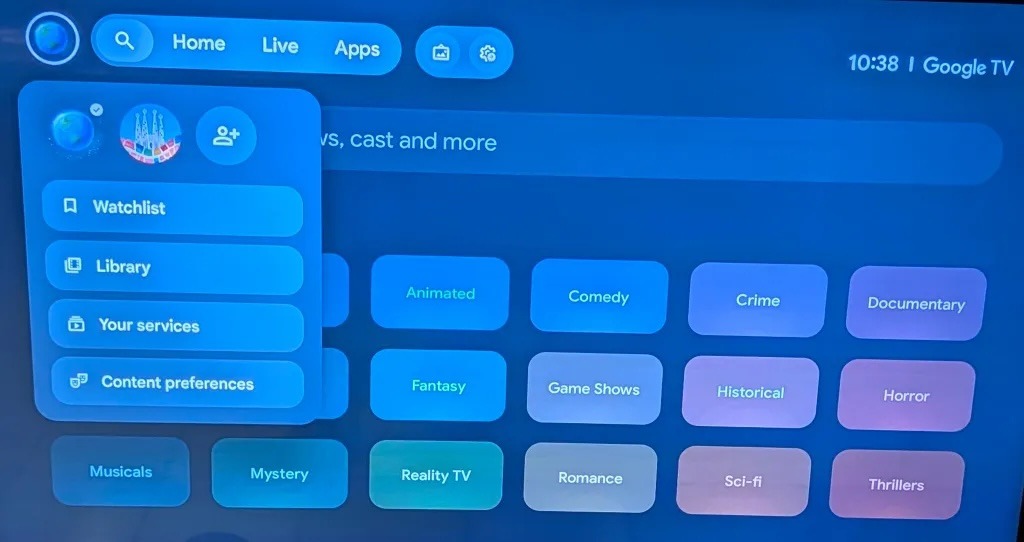
According to 9to5Google, select users are seeing the refreshed interface which groups all navigation buttons in the top-left corner of the screen, replacing the current spread-out layout that has remained largely unchanged since Google TV launched in 2020.
The redesign introduces several notable modifications:
- Navigation buttons consolidated to top-left corner
- “For You” section renamed to “Home”
- Reduced number of navigation tabs
- New dedicated button for screensaver settings
- Profile selector with dropdown menu for Watchlist and purchased movie library access
The update removes the right-aligned settings menu that previously occupied approximately one-third of the screen.
This menu had recently gained Google Home integration features, though it remains unclear where these controls will be relocated in the new design.
The interface update can deploy quickly once available, as it updates through the underlying Google app rather than requiring firmware updates from TV manufacturers.
This allows Google to push changes automatically without user intervention or manufacturer coordination.
For Australian users with Google TV devices like the Chromecast with Google TV ($99) or smart TVs from Sony, TCL, and Hisense, the update should arrive seamlessly when Google expands the rollout.
Coinciding with the interface testing, Google has begun rolling out Gemini AI assistant to Google TV, starting with TCL’s QM9K series TVs launching today.
The AI integration will expand to other devices later this year, including the Google TV Streamer 4K ($99) and Walmart Onn 4K Pro, as well as 2025 models from Hisense and TCL.
Gemini on Google TV extends beyond basic voice commands, offering:
- “Free-flowing conversations” for content discovery
- Show recommendations based on vague descriptions or specific details
- Episode recaps for series catch-up
- Responses to general knowledge questions with related YouTube video suggestions
- Genre-based recommendations accounting for multiple viewers’ preferences
Users can activate Gemini by saying “Hey Google” or pressing the microphone button on their remote.
The assistant provides text responses read aloud, positioning Google TV to compete with Samsung and LG’s upcoming Microsoft Copilot integration announced at CES 2025.
For Australian consumers, Gemini availability will likely follow the global rollout pattern, though specific device compatibility and timing remain unconfirmed for the local market.
The redesign comes as Google TV faces increased competition from:
- Apple TV’s tvOS with its refined interface
- Samsung’s Tizen platform with extensive app support
- Amazon Fire TV’s aggressive pricing and Alexa integration
- Roku’s simple, ad-supported interface
Google TV’s ability to update without manufacturer involvement gives it an advantage over Android TV implementations that rely on OEM updates, potentially allowing faster feature deployment and consistency across devices.
Users dissatisfied with Google TV’s interface can install customisable third-party launchers, though this requires technical knowledge and may void warranties on some devices.
Popular alternatives include Sideload Channel Launcher and FLauncher, which offer ad-free, customisable homescreens.
The redesign suggests Google is responding to user feedback about navigation complexity while preparing the platform for AI-driven features that will require new interface elements.
The consolidation of controls and clearer organisation should improve usability, particularly on remote-controlled TV interfaces where excessive navigation proves frustrating.
For Australian consumers considering Google TV devices, the update promises a more streamlined experience, though the timeline for broad availability remains unconfirmed.